Master Your Finances with This Tax Deduction Tracker
As a creative professional or small business owner, the line between personal and business expenses often blurs. A coffee meeting becomes a networking expense, a software subscription is a necessary tool, and a home office supplies run is part of your operational cost. Keeping this financial web untangled is not just good practice; it's essential for maximizing your deductions and maintaining a healthy business. The challenge is doing so without the chaos of shoeboxes full of crumpled receipts or endless, confusing spreadsheets.
This is where a thoughtful system makes all the difference. The Tax Deduction Tracker Canva Template 3 is designed to be that system—a clear, visual, and actionable tool that transforms expense tracking from a dreaded chore into a simple, organized habit. It’s not about complex accounting; it’s about creating a reliable record that gives you clarity and confidence.
A Clean, Functional Design for Real-World Use
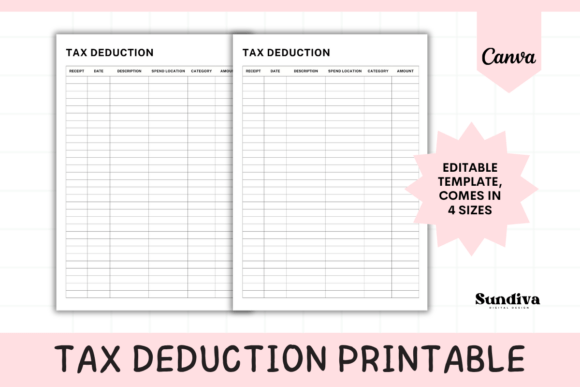
Forget cluttered, overly designed financial templates. The strength of this tracker lies in its straightforward, user-centric layout. It presents six essential columns: Spend Location, Date, Category, Description, Amount, and Receipt. This structure guides you to capture the most critical data for any deductible expense. The visual design is intentionally minimal, using clear typography and ample white space to ensure each entry is easy to read and review. This isn't a template that shouts for attention; it's one that works quietly and effectively in the background of your business operations.
Its personality is practical and professional, appealing directly to the mindset of entrepreneurs, freelancers, and creators who value function over flashy aesthetics. The style is modern and clean, reflecting a contemporary approach to business organization. It feels less like a generic printable and more like a thoughtful piece of design assets created for a specific, vital purpose: keeping your financial records impeccable.
Integrating the Tracker into Your Professional Ecosystem
The true value of any tool is in how seamlessly it fits into your existing workflow. This is where the Tax Deduction Tracker Canva Template 3 shines. Because it’s built in Canva, it leverages a platform you likely already use for social media graphics, presentations, or even logo design. You can access and update it from your computer or the Canva mobile app, making it possible to log an expense immediately after it occurs—whether you’re at a client site, a supply store, or your home office.
Consider its applications across different roles. A graphic designer can track software subscriptions and stock asset purchases. A marketer can log ad spend and conference fees. A blogger or content creator can document equipment and hosting costs. For crafters and hobbyists with a side business, it provides a simple way to separate material costs from personal spending. The template’s availability in multiple sizes (US Letter, Half Letter, A4, A5) means it can be printed and kept in a planner, stored digitally in a cloud folder, or used on-screen—whatever suits your process best.
Building Financial Clarity and Confidence
Consistent use of this tracker does more than just prepare you for tax season. It actively influences your financial awareness and business decisions. By categorizing every expense, you begin to see patterns. You might realize a certain software subscription isn't providing enough value, or that your spending on a particular category is higher than you thought. This level of insight, driven by organized data, is a cornerstone of sound business strategy.
From a brand identity perspective, financial organization contributes to your professionalism. When your records are in order, you can respond swiftly to client queries, provide accurate quotes, and manage cash flow with greater precision. This internal order supports your external reputation. The tracker, in its simplicity, acts as a catalyst for this discipline. It doesn't just store numbers; it helps you understand the story behind your business's financial health.
Practical Guidance for Getting Started
Adopting any new system requires a bit of intention. Here’s how to make this template work for you:
- Establish a Routine: Don’t let receipts pile up. Set a weekly time to log expenses into your tracker. Five minutes every Friday is far easier than an hour of frantic searching in April.
- Customize the Categories: The template provides a foundation. Tailor the "Category" column to fit your specific business. Use terms that make sense to you, like "Creative Tools," "Client Meetings," or "Online Education."
- Leverage the Digital Format: Use Canva’s features to your advantage. You can duplicate pages for different months or quarters, use the search function to find past entries, and easily export a clean PDF for your accountant or your records.
- Pair It with a Filing System: The "Receipt" column is a reminder. Develop a parallel system for physical or digital receipt storage that corresponds to the tracker's line items. Number your receipts and note the number in the description for effortless matching.
Ultimately, the Tax Deduction Tracker Canva Template 3 is more than a printable; it’s a practice. It’s the practice of giving your business the respect of clear, organized financial oversight. By integrating this simple tool into your routine, you move from being reactive about your finances to being proactive, transforming tax time from a period of stress into one of prepared confidence. It’s a small investment of time that pays dividends in clarity, control, and peace of mind.